Most robot vacuum setup guides start with the app. That is backwards. After nine years of cleaning houses for a living and five years of putting robots into client homes, I can tell you that a robot vacuum setup is maybe 10 percent app and 90 percent floors, furniture, and where you plug in the dock. Get those wrong and the fanciest navigation system on the market will circle a phone cord for 40 minutes and go home with an empty bin.
I run a five-person cleaning team out of Raleigh, North Carolina. We service more than 40 houses a week, from 600-square-foot apartments with two cats to 4,000-square-foot houses where every room has a rug on top of a rug. A robot that cannot handle that range does not get recommended by me, no matter what the box promises.
The setup below takes about 30 minutes. The habits it creates take about one minute a day. The gap between a robot vacuum that is still running in five years and one that is stuffed in a closet by month three is almost entirely about which of those two things you actually do.
Why you should trust me
I have cleaned professionally since 2016 and run my own team now, which means I have watched robots fail in every floor plan a person can build. I have seen one beach itself on a dark rug because a cliff sensor panicked. I have seen one eat a charging cord so thoroughly that the cord came out in three pieces. I have seen a "smart map" forget the entire second floor after a firmware update.
The only metric I trust is what I call the mess index: what is actually in the dustbin after a scheduled run. Not what the app reports. Not the square footage on the dashboard. The bin. A robot can map your whole house in eight minutes and still leave you a one-inch strip of dust along every baseboard, and the bin will tell you the truth about which one you own.
I do not recommend anything I have not lived with. Every unit I put my name on has spent a month in real homes with real pets and real mess, because a showroom floor tells you nothing about a Tuesday.
How I picked and how I tested
Before any robot gets scheduled unsupervised in a client's house, it goes through four checks in my own home first.
One, does the bin fill with real dust or just fluff? Fluff means the brush is pushing debris around instead of lifting it.
Two, can it cross my test rug with a half-inch lip three runs in a row without stalling? If it cannot handle a rug transition, it cannot handle your house. No exceptions.
Three, does the app survive a firmware update without wiping the schedule? I have re-drawn no-go zones after an update more times than I want to admit.
Four, would I leave it alone in a client's home? That means no cords on the floor, no pet accidents waiting, and a dock that does not get bumped.
The two machines below are the ones that fit the workflow in this guide: one for a simple floor plan on a tight budget, one for a house with pets and carpet where the bin is the real bottleneck.
The two machines that fit this workflow
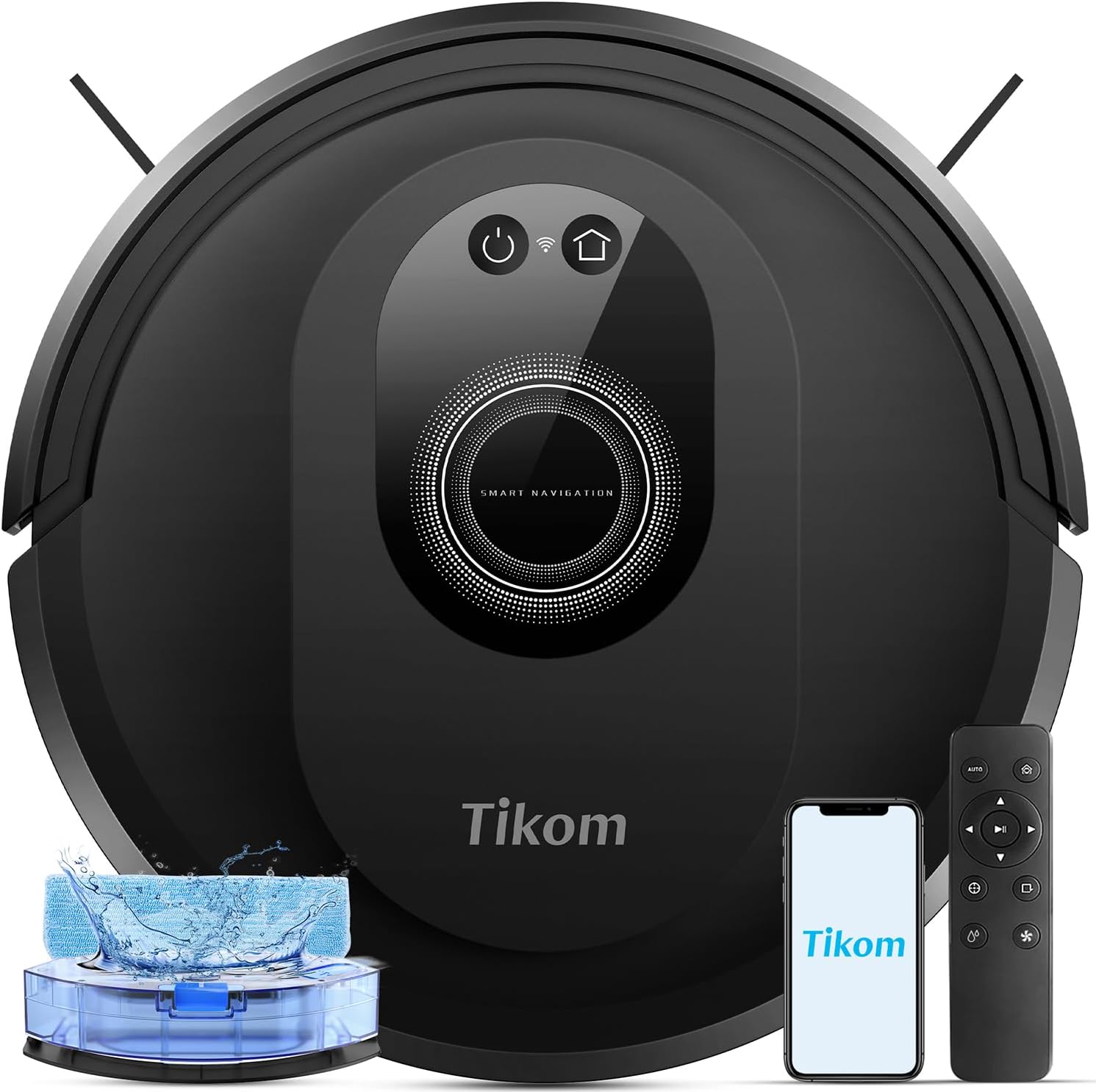
Budget pick: Tikom Robot Vacuum and Mop Combo, 5000Pa Robotic Vacuum Cleaner, 150 Min Max, App & Remote Control, Ideal for Hard Floor, Carpet, Pet Hair, Self-Charge (G8000 Max)
 Visit on Amazon →
The spec list here is 5000Pa of suction, up to 150 minutes of runtime, app and remote control, and a self-charging dock. That combination is built for a hard-floor apartment or a single-level house with low-pile rugs and no stairs. The runtime matters more than people think: 150 minutes is enough to run a small home twice on one charge, which means you can schedule it mid-morning and forget it.
This is not a self-emptying unit, so the bin is your job. That is the trade. You get a lower entry point and a smaller dock footprint, and in exchange you dump the bin after runs and you get very familiar with your own dust. If you have two cats and a 2,000-square-foot house, that trade gets old in about ten days. If you have 700 square feet and no pets, it never gets old at all.
The remote control is the feature I use most with clients who refuse to install an app. A robot that only works through a phone is a robot that stops working the day someone changes the wifi password.
Flaws but not dealbreakers: The mop on this class of machine is a damp pad you drag around, not a scrubber. Treat it as a maintenance wipe between real mopping, and never leave the pad on the machine wet. The navigation is basic, which is fine in an open floor plan and frustrating in a house with a maze of dining chairs.
Anyone in a small home with hard floors and no shedding pets will get years out of this one.
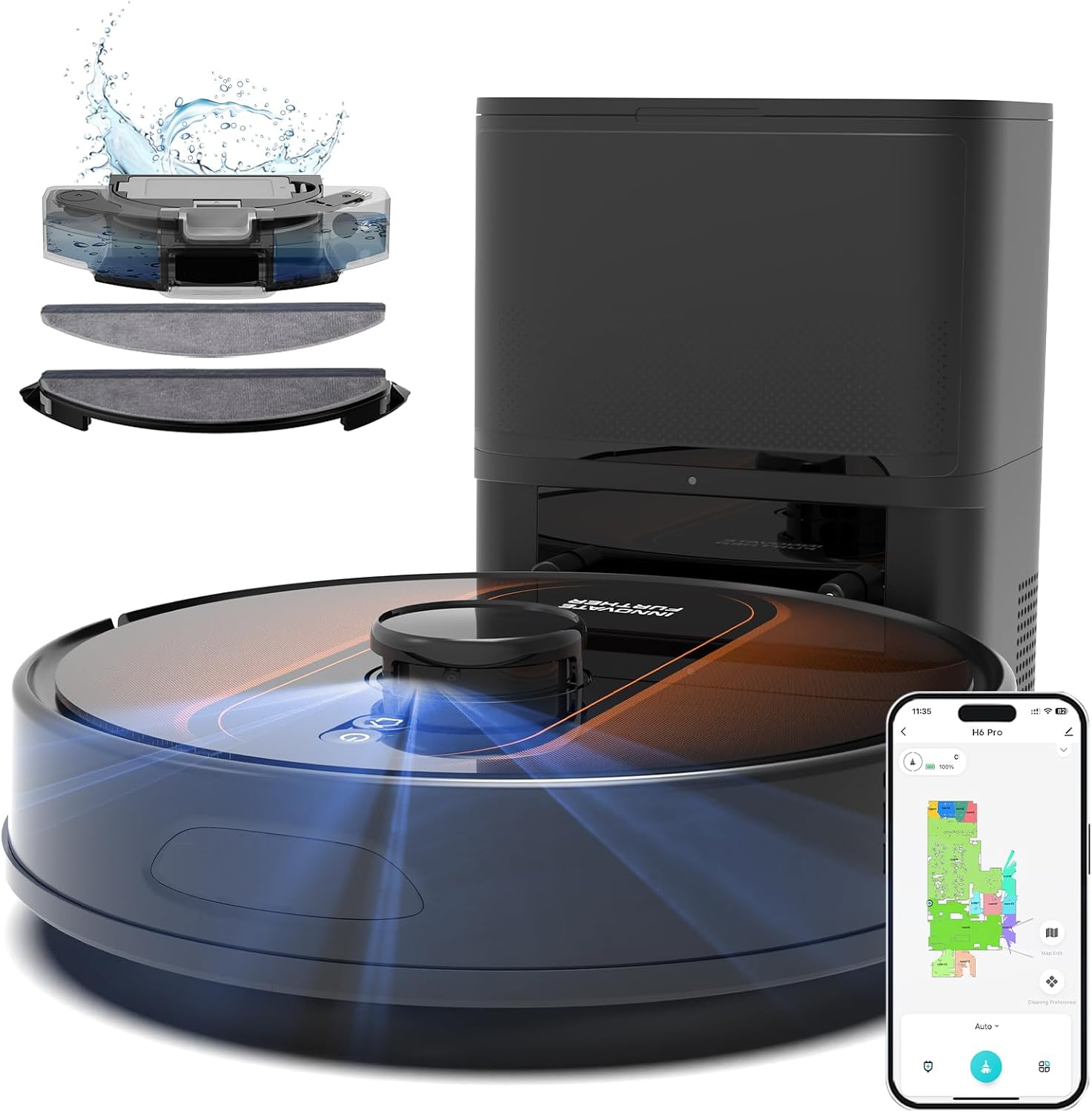
Upgrade pick: Robot Vacuum and Mop with Mapping, 6000Pa LIDAR Navigation Self Emptying Robotic Vacuum, Alexa/APP Control, 3-in-1, 90 Days Hands-Free Cleaning
 Visit on Amazon →
This is the one that changes the daily math. The listing claims 6000Pa of suction, LIDAR navigation with mapping, a self-emptying dock rated for up to 90 days of hands-free cleaning, and Alexa plus app control. The self-empty dock is the entire point. With pets, self-emptying stops being a luxury and starts being survival, because the difference between a daily bin dump and a monthly bag swap is the difference between a robot that runs every day and one that sits dead with a full bin while you mean to get to it.
LIDAR mapping plus no-go zones is the second thing that matters. On a mapped floor plan you can wall off the cable nest behind the TV, the dog bowls, and the spot where the Christmas tree goes in December, and those zones persist run after run. On a robot without real mapping, you are re-drawing your life every time it rediscovers the house.
Flaws but not dealbreakers: The self-empty dock is physically larger than a standard charging base, so measure your wall space before you commit. The bags are a consumable, and the bin on the dock is a small sealed bag that needs swapping on its own schedule. LIDAR still needs a floor it can see, so cord clutter will trip it up exactly like every other robot.
Anyone with shedding pets, carpet transitions, and more than one room worth mapping should start here.
Setup: the steps I run in every house
Step one: clear the floor before the first run, not after. Cords, socks, phone chargers, bath mats with fringe, the cat's toy with the string. Everything a robot can eat has to be off the floor before the robot meets the floor. This is the step people skip, and it is the step that decides everything.
Step two: place the dock on hard flooring against a wall. Not on carpet, not in a corner where the robot has to shimmy sideways to reach it. Leave open wall on both sides and a few feet of clear approach in front. Once you pick the spot, that spot is permanent.
Step three: do a supervised first run and take notes. Follow it around like it is a new employee. Every place it gets stuck, hesitates, or gives up is a note for the next step. You are not watching it clean. You are watching it fail.
Step four: fix the failures you just watched. A rug that flips up needs a rug pad or a strip of double-sided tape under the edge. A chair it climbs needs a no-go zone. A dark rug that triggers the drop sensors needs that room marked off. Ten minutes of fixing here saves a hundred runs of rescuing.
Step five: let it map, then never move the dock. On a LIDAR unit, the map is anchored to the dock. Move the dock and you are starting over. If you have to relocate it, expect a fresh mapping run.
Step six: set your no-go zones once and check them after every app update. Cords, pet bowls, the office chair on its rug. Then check them again after the next firmware update, because this is the thing updates break.
Step seven: schedule it daily, while you are out of the house. One run a day beats four runs on Saturday. Daily runs mean the bin collects less each time, the floors never hit a real low, and the robot spends its life doing maintenance instead of disaster recovery.
Step eight: set suction by surface. High on carpet, low or quiet on hard floor. Running max suction on tile every day just burns battery and makes noise for no reason.
Step nine: make the first month a supervised month. Puppies, kittens, and new rugs all deserve a human in the building while the robot runs. Obstacle avoidance is good, not psychic.
Step ten: empty the bin daily for the first month and read it. The mess index is your feedback loop. Fine grey dust every day means the floors are actually being cleaned. Fluff and hairballs mean the brush is smearing.
The bin is the whole review
Self-emptying does not mean never. It means you swap a bag on the dock's schedule instead of dumping a bin every day. That is the entire trade, and it is worth it the moment you have a shedding animal.
What still needs doing on a self-emptying unit: check the filter and rinse it on the interval the manual gives you, cut hair off the brush roll when it stops spinning freely, wipe the sensors, and check the bag. If any of those sound like too much, remember that the alternative is a robot that cleans worse every week without telling you.
What needs doing on a standard bin unit: empty it after every run, or every other run at the very least. A full bin does not just hold less. It stops sealing, and a bin that does not seal blows dust back onto the floor you just cleaned.
The habit is one minute. That minute is the difference between a maintenance tool and a paperweight.
What goes wrong after setup
The robot rediscovers the house every run. Something changed. Either the dock moved, the wifi dropped, or the machine lost its map in an update. Fix the dock first, since it is the anchor.
It eats charging cords. This is a floor problem, not a robot problem. Cord covers or a cord channel behind the furniture solves it permanently.
It avoids a dark rug. Cliff sensors read dark, flat surfaces as a drop. Mark that area off or move the rug.
It leaves a strip along the baseboards. Some of that is unavoidable, some of it is a brush that is clogged. Clean the brush and check the edge-cleaning performance on a hard floor run, not on carpet where you cannot see it.
The mop pad smells. You left it wet and sealed against the plate. Rinse it and let it dry off the machine.
What I left off the list
Cheap combos with spinning mop pads that just smear a wet circle around the room. Any unit where you cannot find replacement filters, brushes, and bags. Anything with a bin that needs a screwdriver to open. And any robot I would not leave unsupervised in a client's home, which rules out more machines than you would expect.
The bottom line
The budget unit and the self-emptying unit are not competing. They are for two different houses. If your floors are hard, your home is small, and nobody sheds, the simple machine does the job and the daily bin dump is thirty seconds you will not mind. If you have pets, carpet transitions, and more than one room worth mapping, the self-emptying dock is the feature that keeps the robot running every day, and daily is where the results come from.
Start with the floors. Pick the dock spot. Then let the bin tell you the truth.