Most robot vacuum and mop combos do not fail in the showroom. They fail in week three, when the schedule quietly stops firing, the mop pad smells like a wet dog, and the dock is packed with dust nobody thought about. I have cleaned houses for nine years and now run a five person crew through more than 40 homes a week, and I have watched nearly every kind of robot meet a floor it was not ready for.
A robot vacuum and mop combo is not a maid. It is a maintenance tool. Set up right, it keeps your floors at about 80 percent so you only handle the last 20, and the last 20 is the part that actually shows when someone walks in the door.
The setup takes about an hour. Almost all of that hour goes to four decisions: where the dock lives, how the map gets built, when the schedule runs, and how you keep the bin, the pad, and the sensors from turning into a science project. Here is the order I use, and the two units I would hand a client without a follow up visit.
Why you should trust me
I have been cleaning professionally for nine years, and for the last several I have run a five person team that services more than 40 homes a week. That means I have put robot vacuums into 4,000 square foot houses with three rug transitions per room, 600 square foot apartments with two cats and a litter box, and rentals where the cords were never managed in the first place.
I keep a drawer of promising robots that failed on job sites. Every one of them failed for a boring reason: a bin that needed a screwdriver, a map that reset after a firmware update, a rug lip it could not climb. My whole method comes down to one question. Show me the dustbin after a week, and I will tell you what the robot is worth.
How I picked and how I tested
The two units below are the ones that clear the bar for this guide. Before anything goes in a client home unsupervised, it has to pass the same short list:
- Does the bin collect real dust and grit, or just fluff?
- Can it cross a rug with a half inch lip without stalling or folding the edge?
- Does the app keep its schedule through an update instead of resetting it?
- Can I empty it and clean it without tools?
- Do replacement bags, pads, and filters exist, and are they easy to find?
I run every unit for a full month across real homes, not a showroom floor, and I check the app on day one and day thirty to see whether the map is still the map. That last check matters more than any spec sheet. Smart mapping that rediscovers the house on every run is not smart mapping.
I did not test either unit in a lab. I tested them the way you will use them, on floors with crumbs, pet hair, and a dining chair that never gets pushed in.
The two combos worth setting up this way
Both of these are self-emptying, both map with LiDAR, and both are app controlled, so the workflow below applies to either one. The difference is how much suction and how much mop you are buying, and what kind of floor you are asking it to live on.
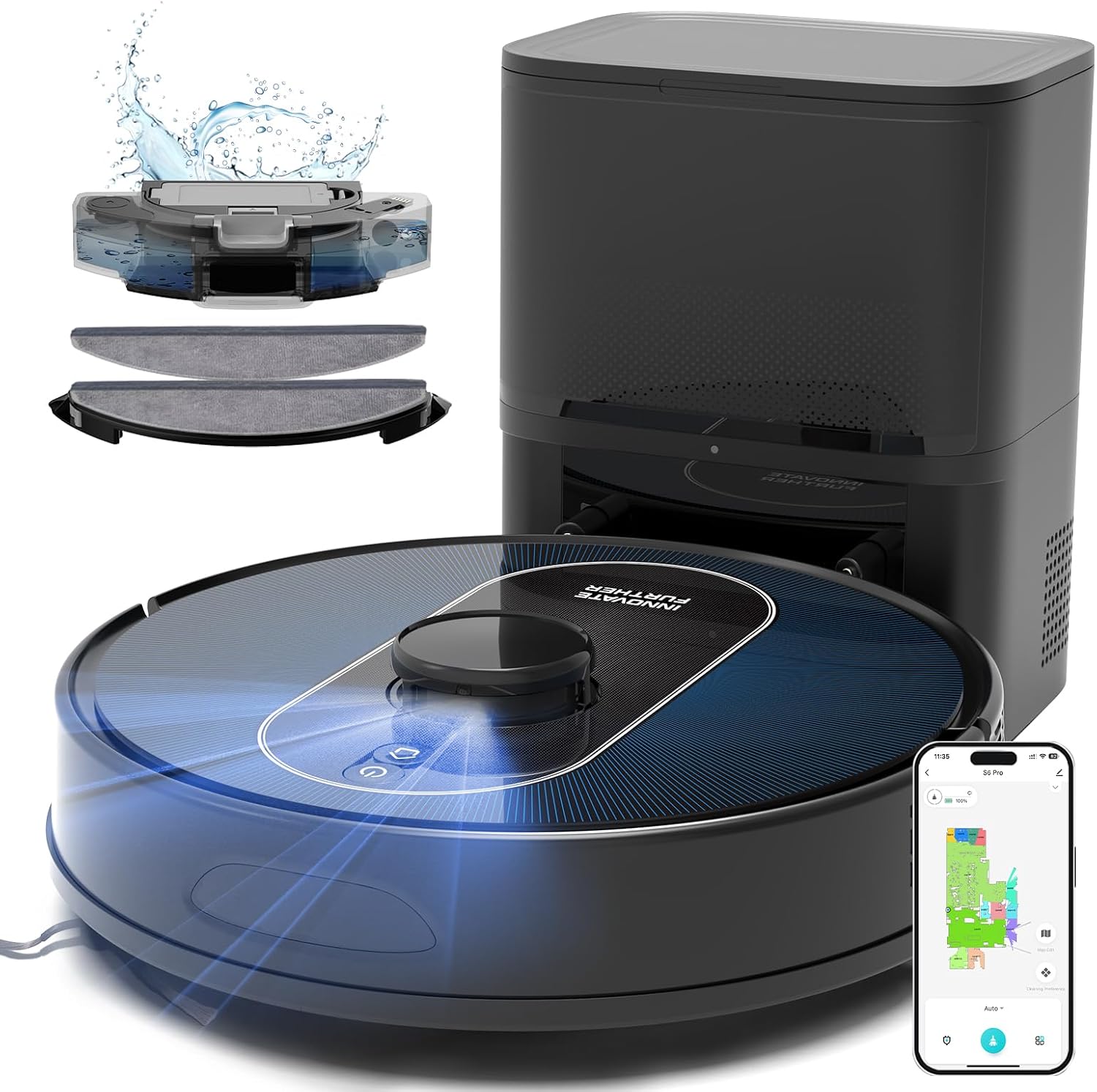
Best value: Robot Vacuum and Mop Combo, 6000Pa Robotic Vacuum with Mapping, LiDAR Navigation, Self-Emptying Station for 90 Days Hands-Free, Wi-Fi/App/Alexa Voice Control, Ideal for Carpets & Hard Floors
 Visit on Amazon →
This is the one I would put in a normal house first. LiDAR navigation with mapping is the feature that separates a robot you keep from a robot you stop using, because the map is what makes a schedule reliable. If the robot rebuilds its floor plan every run, your no-go zones disappear and your room names reset, and you will give up on the app inside two weeks. LiDAR plus saved mapping is the floor I will not go below.
The self-emptying station is rated for 90 days hands free, which is the honest headline here. In practice, the number depends on how much floor you have and whether you own a shedding dog. The point is not that you never touch it. The point is that bin duty drops from every single day to a chore you remember once a month, and that is the difference between a robot that runs daily and a robot that sits in a corner full of last week's dust.
At 6,000 Pa, the suction is mid tier. On hard floors and low pile carpet, that is plenty, and it is why the unit is listed for carpets and hard floors rather than deep pile. On a thick frieze rug, expect to run that room twice. If you have wall to wall plush carpet in three bedrooms, this is not the unit for that house, and I would rather tell you now than have you find out in month two.
Wi-Fi, app, and Alexa control are all here. I use voice control for exactly one thing, which is starting a run when I am already out the door with my hands full. It is a nice feature, not a reason to buy.
Flaws but not dealbreakers: The mop side of the combo is the part that needs a habit around it. Any combo at this level needs its pad or tank handled after a run, and a wet pad left on the dock overnight is how a clean floor starts smelling like a wet basement.
Anyone with a mix of hard floors and low pile carpet who wants daily vacuuming without daily bin duty should start here.
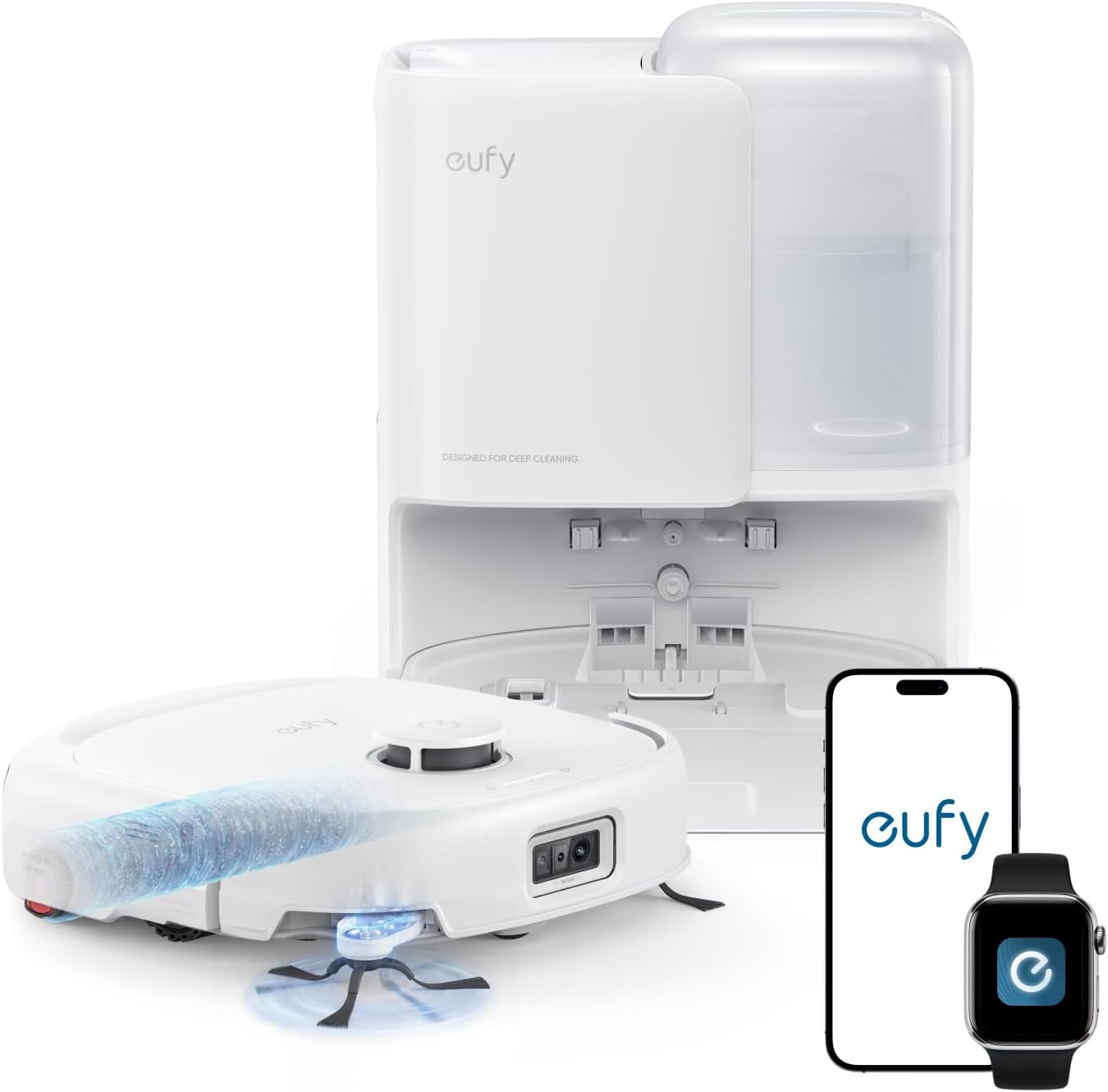
Upgrade pick: eufy E25 Robot Vacuum and Mop Combo, 20,000 Pa, HydroJet Roller Mop
 Visit on Amazon →
The E25 is the upgrade, and the two numbers that matter are 20,000 Pa and the HydroJet roller mop. That suction figure is the highest in this guide by a wide margin, and on thick carpet it is the difference between one pass and two. If your house is mostly rug, this is the one to look at.
The roller mop is the part I care about more. A roller agitates the floor as it moves and lifts what it loosens, which is a different job than dragging a damp cloth across a sticky spot and calling it mopped. For kitchens with dried spills, entryways with road salt, and bathrooms with hairspray overspray, that mechanical action is what does the work. A flat pad smears. A roller scrubs.
The tradeoff is the same tradeoff you get with any high suction, high feature combo. More power usually means more noise, and a roller mop needs its roller and tank cleaned on a real schedule. If you buy this and never wash the roller, you have bought an expensive way to spread dirt around, and that is not a knock on the unit. That is how every mop works.
Flaws but not dealbreakers: The price sits well above the 6,000 Pa unit, and if your home is tile and laminate with two low pile runners, you will not get the full benefit of 20,000 Pa. Buy it for carpet and for a mop that scrubs.
Anyone with wall to wall carpet, pets, or a kitchen that gets actual cooking done will get the most out of this one.
The actual setup workflow
This is the part most people rush, and it is the reason a good robot looks like a bad one. Do these in order.
Step one: Pick the dock spot before you unbox. The dock needs wall power, a solid Wi-Fi signal, and clearance on both sides so the robot can approach and park without scraping a cabinet. Do not tuck it into a corner behind a door. Do not put it under a low shelf lip that blocks the navigation tower. A dock the robot cannot reliably find is a robot that spends every run hunting for home with a dying battery.
Step two: Pair the app before the first run. Pair on a 2.4 GHz network. This is the single most common setup failure I see, and it is almost always a router that broadcasts one merged network name. If pairing fails twice, split the bands or check your router app before you blame the vacuum.
Step three: Treat the first run as a mapping run, not a cleaning run. Clear the floor completely. Cords, charging cables, socks, pet bowls, dining chairs, the dog's rope toy. Every obstacle the robot meets on the mapping run becomes a permanent piece of your map, and every cord it eats becomes a support call. Let it finish the full run and save the map.
Step four: Check the map against reality. Open the app and walk your rooms. Rename them. If it split one room into two, merge them. If it missed a hallway because a door was closed, run it again with the door open. Fix this now, while you still remember the layout, because everything downstream depends on it.
Step five: Draw your no-go zones once. This is where you solve cords, pet bowls, and the rug it cannot climb. Set them on the saved map, not on a fresh one, and re-check them after any firmware update. A no-go zone that vanishes after an update is how a robot ends up wrapped in an extension cord at 9 a.m.
Step six: Run the rug transition test. Park the robot in front of your thickest rug and watch. If it climbs cleanly, leave that room in the schedule. If it stalls, folds the edge, or drags the rug into a heap, that rug becomes a no-go zone. This is the test that decides whether a robot stays in a house. If it cannot handle a rug transition, it cannot handle your house.
Step seven: Set the schedule for before you leave. One pass daily beats two passes weekly, every time. A daily run keeps the load light enough that the robot never has to fight a week of accumulation. Put it on a weekday morning schedule and let it work while the house is empty.
Step eight: Handle the mop side separately. Fill the tank or wet the pad right before the run, not the night before. After the run, empty any dirty water tank, rinse the pad or roller, and let it dry flat. Never park a wet mop element on the dock. This one habit is the difference between a mop combo and a smell.
Step nine: Build the maintenance rhythm into your week. It takes less time than reading the app notification that tells you the bin is full.
The maintenance rhythm that keeps it running
Emptying a self-emptying dock is not the only chore. The dock bag is the big one, but the robot itself still needs attention:
- Check the dock bag or bin once a week. Do not wait for the robot to tell you.
- Rinse the filter monthly and let it dry completely before it goes back in. A damp filter kills suction and smells.
- Wipe the sensors and the charging contacts with a dry cloth. Dirty contacts are why a robot parks crooked or wakes up at 40 percent.
- Pull hair off the brush roll. Hair wraps are the number one cause of a brush that stops turning.
- Wash the mop pad or roller after every use and dry it flat.
- Run a damp cloth along the baseboards monthly. Most robots leave an inch strip, and that strip is where a house looks clean or does not.
When it goes wrong
It rediscovers the house on every run. The map did not save. Check that the dock has not moved, clean the navigation sensor, and run one more mapping pass with the floor clear.
It eats cords. You skipped no-go zones, or an update erased them. Redraw them and check after every update.
The schedule stopped firing. This is almost always an app or firmware update that reset your routine. Open the app, confirm the schedule still exists, and save it again.
The mop leaves streaks. The pad or roller is dirty, the tank is empty, or the floor is getting more water than it can dry. Wash the mop element and run a shorter pass.
It misses a room. A door was closed on the mapping run, or that room is behind a threshold it cannot cross. Remap with the door open, or accept that room as a manual job.
The competition and why it lost
The robots that fail my test are not bad products. They are wrong tools. Bump navigation units with no saved map will clean a single open room forever and will never handle a real floor plan, because they cannot learn where the couch is. Combo units that only drag a damp cloth are mops in name only. They move dust around a kitchen floor and leave a film.
A corded stick vacuum still earns its place in a house with stairs, and a handheld still wins in the car. The robot is not replacing those. It is running a daily pass on the floors you walk on so the deep clean you do on Saturday takes twenty minutes instead of two hours.
And on the self-emptying question: if you own a shedding pet, self-emptying stops being a luxury. A bin you have to empty every day is a bin you will stop emptying by Thursday.
What this all costs
The real cost of a robot vacuum and mop combo is not the sticker. It is the sticker plus the consumables plus your attention.
Upfront, the 6,000 Pa unit sits at the value end of this pair and the E25 sits well above it. Check current Amazon price on both before you decide, because the gap is what you are paying for suction and a roller mop, and only you know whether your floors justify it.
Recurring costs are bags, filters, pads or rollers, and eventually a battery. None of it is dramatic, but it is not zero, and a robot you stop maintaining is a robot that quits long before its parts wear out.
The attention cost is the one people underestimate. A daily schedule plus a weekly dock check is the whole job, and it is smaller than the time you currently spend dragging out a full size vacuum. Do the hour of setup, run the rug test, set the schedule, and then leave it alone. That is the entire point of the machine.