
Most robot vacuums do not fail because of suction. They fail because nobody built a robot vacuum schedule that survives an ordinary Tuesday. The unit arrives, it runs twice, someone trips over the dock, and six weeks later it is an expensive dust collector in a closet. I have watched that happen in client homes at every price point on the market, and the pattern never changes. The owner bought hardware and skipped the routine.
A robot vacuum schedule is not one calendar entry you make once and forget. It is four decisions: where the dock lives, which rooms run on which days, what the mop is allowed to touch, and who empties what. Get those right and a mid-priced robot keeps your floors at 80% forever. Get them wrong and the most expensive unit on the shelf will still disappoint you.
Here is the exact routine I install in client homes, in the order I install it.
Why you should trust me
I have cleaned houses professionally for nine years, and I now run a five person crew that services more than 40 homes a week around Raleigh. I have put robot vacuums into 4,000 square foot houses with three shedding dogs, 600 square foot apartments with two cats, and rentals where every charging cord in the house lives on the floor. I own a drawer full of promising robots that failed on job sites.
My rule is simple: no unit goes on a client's schedule until it has spent a full month in real homes, not a showroom floor. The steps below are the same ones I hand to a client after the install, because the setup is what determines whether the robot keeps working in month six.
How I judge a robot before it earns a schedule
Four tests decide everything, and none of them are about the spec sheet.
- The mess index. What is actually in the bin after a scheduled run? If it is packed with hair, grit, and crumbs, the robot is working. If it is nothing but fluff, the schedule is wrong or the floor was already clean.
- The rug transition. Every home I clean has at least one rug with a half inch lip. A robot that stalls, spins, or gives up on that lip will fail in a real house. No exceptions.
- Obstacle avoidance. Cords, pet waste, socks, a phone charger on the floor. The sensors that handle this are not equal across brands, and this is the test that decides whether I trust a unit unsupervised.
- The app after a firmware update. Does the schedule survive? Does the map survive? A robot that rediscovers the house every run is a toy with a battery.
The two units below sit at opposite ends of the market, and the setup routine in this guide applies to both of them.
Two robots that make a daily schedule realistic
The steps that follow work on any modern robot vacuum, but these two are the ones I would build a schedule around first, because each one removes a different chore from your week.
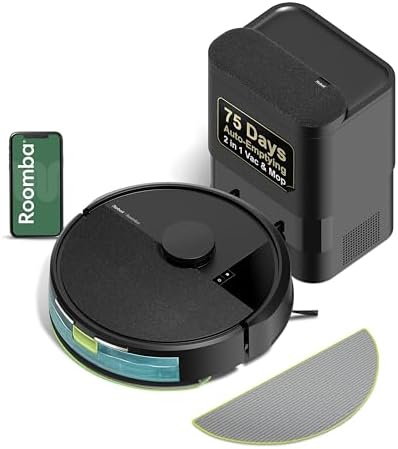
Value pick: iRobot Roomba 105 Combo Robot Vacuum & Mop with AutoEmpty Dock - Self-Empties for 75 Days, Intense Power-Lifting Suction, LiDAR Navigation, Multiple Cleaning Modes, Avoids Mopping Carpet
 Visit on Amazon →
Check current Amazon price. This is the unit I point people to when they want a self-emptying dock without paying flagship money. Three features in that name matter for a schedule. The AutoEmpty dock self-empties for up to 75 days, which turns bin duty from a daily chore into a monthly one in a home without pets. LiDAR navigation means the map is built with a spinning sensor rather than a camera, so room by room scheduling holds up in the dark and behind furniture. And it avoids mopping carpet, which removes the single most common combo-unit failure I see, a wet mop pad dragged across a bedroom rug.
iRobot also has the best support network in this category. When something breaks, and something always breaks, you want a company with a repair pipeline and a parts catalog. That matters more than any app feature.
Flaws but not dealbreakers: The dock uses bags, so self-emptying just moves the emptying to a consumable you have to buy. In a home with two shedding dogs you will replace them well before 75 days. You still need to pull the brush roll and check for wrapped hair once a week, because the dock empties the bin, not the roller.
Anyone who wants a set and mostly forget schedule in a normal home, with one or two rugs and no pets, will be happy here.
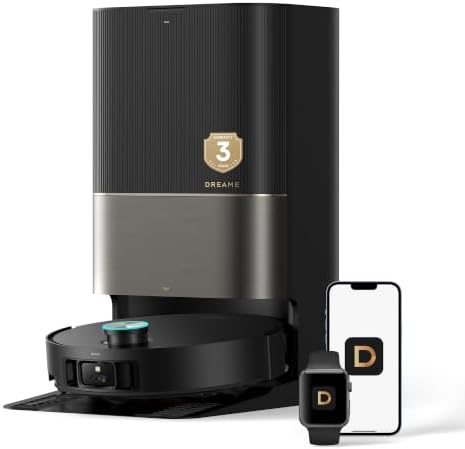
Upgrade pick: dreame X50 Ultra with Self-Cleaning All in One Robot Vacuum and Mop
 Visit on Amazon →
Check current Amazon price. Dreame is the dark horse in this category. It tends to deliver more suction per dollar than the name brand everybody defaults to, and the all in one base is the reason this unit changes the schedule math. An all in one dock that also self-cleans the mop means the wet side of the job stops being your problem between runs, which is the part of combo ownership that makes people quit.
Flaws but not dealbreakers: More dock hardware means more to maintain and more to fail. Dreame's app and support are a step behind iRobot's, so budget an extra fifteen minutes for the first setup and expect to re-check your no-go zones after a firmware update. If you want a robot to run for four years with the least fuss when something goes wrong, this is not the safe pick.
Anyone with mostly hard floors, a big main living area, and a genuine mopping need should look here first.
Step 1: Choose the dock location before you unbox anything
Put the dock on hard floor, flat against a wall, with about three feet of open space on both sides and in front of it. A dock sitting on a rug is a problem, because the robot climbs the rug edge on the way home and can miss the charging contacts. A dock tucked behind a couch or beside a curtain is worse, because the robot eats the curtain on every single run.
Keep the dock on a circuit you never switch off. Do not put it on a smart plug that you kill at night, and do not put it on a switched outlet. A robot that wakes up to a dead dock misses its run and, depending on the app, may skip the whole day.
Step 2: Prep the floor once, then stop thinking about it
This is a one time twenty minute job that decides whether the schedule works. Walk the floor and fix the obvious things. Tuck or cover charging cords. Pick up the bath mat and the dog bowls. Tape down or ramp the rug transition that your robot will hit every day. Add a no-go zone or close the door on the bathroom if the floor is always wet.
If a robot cannot handle your rug transition, it cannot handle your house. Fix the transition once and you fix it forever.
Step 3: Run the first mapping pass with the lights on
Empty the floor, start the map, and let it finish without interrupting. LiDAR units map in the dark, but camera based obstacle avoidance wants light, so leave the lights on for the first pass either way. When the map is done, edit it. Name the rooms, set no-go zones, and mark carpet zones before you build a single schedule.
Then check the map after every firmware update. Smart mapping that rediscovers the house on every run is the fastest way to make a good robot useless, and map resets are the most common complaint I hear from clients who never touch their app.
Step 4: Build the schedule around your mess index, not your mood
The mess index is what is left in the bin after a scheduled run, and it is the only honest performance metric you have. Set your schedule, then read the bin for a week.
- Kitchen and main hallway: daily. This is where the traffic and the crumbs live.
- Bedrooms: every other day. Hair and dust build at a slower rate than kitchen debris.
- Bathrooms and guest rooms: once a week.
- Whole house in one run: usually a mistake. Two shorter runs beat one long one, because a full bin stops lifting debris well before the battery dies.
Pick a start time when the floor is clear. If you schedule a run for 7 a.m. and your house is full of people and shoes at 7 a.m., you built a schedule that fights your household. Most apps let you set per room start times, so use them.
If the bin comes back full of fluff and nothing else after a week, you are running that room too often. If it comes back packed with grit and hair, daily is not enough for that floor.
Step 5: Set the mop rules so carpet stays dry
Dry vacuum first, mop second, always. A mop pad pushed over loose grit just smears it around, and that is how combo units get their bad reputation. Set no-mop zones on every rug you cannot wash, and set them on carpet before the first mopping run, not after.
Skip any combo unit under $400 unless your only floor is sealed tile. At that price the mop is a wet cloth on a spring, and it smears more than it cleans. Empty the dirty water tank the same day you mop, because a tank left overnight is a smell you will not get out of the base.
Step 6: Make bin emptying a habit
Self-emptying is a luxury until you have pets, and then it is survival. But every self-emptying dock still has a bag, a filter, and a bin that needs eyes on it. Stack the check onto something you already do. Look at the bin and the bag when you take out the kitchen trash, and pull the brush roll once a week to cut wrapped hair off the ends.
A robot vacuum is a maintenance tool, not a maid. It keeps floors at 80% so you do the last 20% by hand.
Step 7: Maintain it monthly
Ten minutes a month keeps a schedule alive. Wipe the sensors and the charging contacts, rinse or replace the filter, check the wheels for hair, and look at the dock for dust buildup around the suction port. Then re-check the map and confirm your no-go zones are still where you drew them.
Common mistakes that break a schedule
- Running the robot while everyone is home, with shoes and cords on the floor.
- Putting the dock on a switched outlet or a smart plug you turn off.
- Trusting the map after a firmware update without checking it.
- Mopping before vacuuming.
- Setting a schedule you have to be home to supervise.
- Buying a combo mop under $400 and expecting clean tile.
The competition and why it lost
The Roborock Q5+ is the best value self-emptying unit I have cleaned up after. Good suction, a solid app, and a bin that actually seals. It is not in this guide because the two units above cover the value and upgrade ends of the 2026 market more cleanly.
The Roomba j7+ is still the best pick for pet owners, because the obstacle avoidance genuinely avoids pet waste, and I have seen that save a floor. If you have a puppy in the house, that is a different article and a different priority.
The Eufy RoboVac is fine for a small apartment with no rugs, and that is the only context I would recommend it in. Anything with a rug transition will expose it.
And any combo mop under $400 belongs on this list of things that lost, because a schedule built around a smearing mop is a schedule you will abandon.
What this all costs
Both units in this guide have current pricing on Amazon, so check current Amazon price on each one rather than trusting a number from last month. Then do the only math that matters: take what you pay and divide it by the runs you will actually get in a year. A robot on a daily schedule runs roughly 300 times. Consumables add to that, including dock bags, filters, brush rolls, and mop pads, so budget for the upkeep the same way you budget for the unit.
The value unit keeps the entry cost low and the consumables modest. The upgrade unit moves more of the maintenance into the dock, which is worth it if mopping was the chore you were trying to escape. Either way, the setup routine above is what turns the purchase into a habit.
The mapping app is a toy. The dustbin is the truth. Run it daily, read the bin, and let the robot do the 80%.